

Before you inventory technology, you must inventory people.
Mortgage companies do not lose customer information because a hacker “breaks into a server.” Most losses occur because a person had access they didn’t need, used an unsecured device, or kept access after a role change or termination.
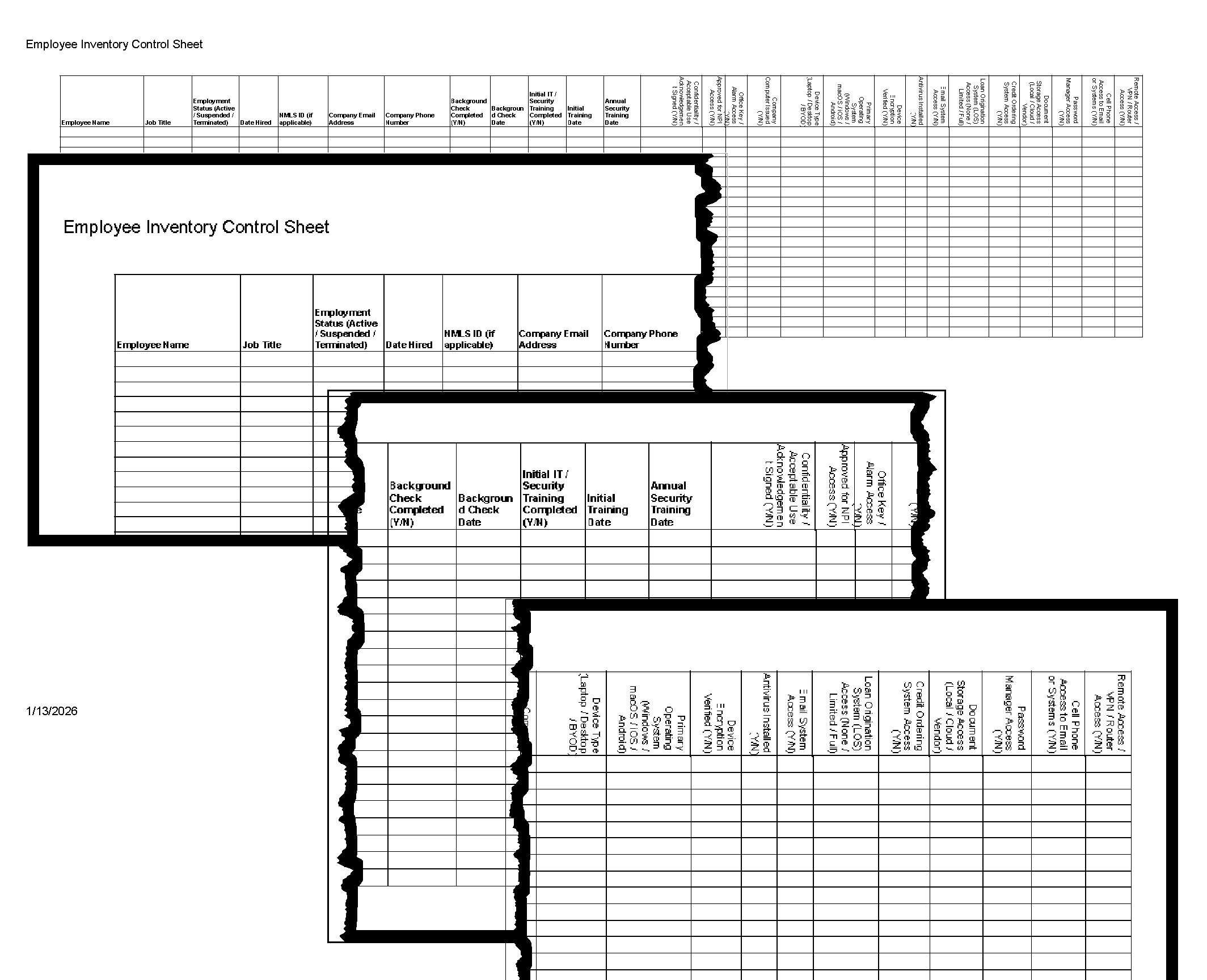
FORM 2-90-21 Employee Inventory Control Sheet exists to document, in one place:
Who can access customer Non-Public Personal Information (NPI)
How they access it (systems + devices)
Whether they met onboarding requirements first
How access can be suspended or terminated quickly
This is one of the most effective cybersecurity controls a small company can implement.
What This Form Proves (in plain English)
A completed employee inventory sheet demonstrates that the company:
Identifies each employee who can access NPI
Controls access based on job duties
Verifies training and background checks before granting access
Tracks which systems contain NPI
Tracks which devices can access NPI
Can disable access quickly during an incident or termination
If your company can produce this sheet on demand, you are already ahead of most small mortgage brokers.
Step-by-Step: How to Complete FORM 2-90-21
Step 1 — Enter the employee identity fields
Complete the basic employee identity fields first:
Employee Name
Job Title
Employment Status (Active / Suspended / Terminated)
Date Hired
NMLS ID (if applicable)
Company Email Address
Company Phone Number
Why this matters:
This establishes accountability and role-based access.
Step 2 — Complete the “pre-access gatekeeper” controls
This is the most important part of the form.
Before granting access to any customer information, confirm:
Background Check Completed (Y/N)
Background Check Date
Initial IT / Security Training Completed (Y/N)
Initial Training Date
Annual Security Training Date
Acceptable Use / Confidentiality / Acknowledgement Signed (Y/N)
Approved for NPI Access (Y/N)
Practical rule:
If any of these items are incomplete, the employee should not have system access.
This section prevents the most common small-company failure:
“We hired them, so we gave them access.”
Step 3 — Document physical access (because paper still matters)
Mortgage companies still handle NPI physically (printed applications, ID copies, income docs).
Record:
Office Key / Alarm Access (Y/N)
Why this matters:
Cybersecurity controls do not matter if physical access is uncontrolled.
Step 4 — Document the device access points
This section identifies the devices through which NPI can be accessed.
Complete:
Company Computer Issued (Y/N)
Device Type (Laptop / Desktop / BYOD)
Primary Operating System (Windows / macOS / iOS / Android)
Device Encryption Verified (Y/N)
Antivirus Installed (Y/N)
Why this matters:
If a device can open email, it can expose NPI.
This section also supports rapid incident response:
lost laptop
stolen phone
employee separation
suspected compromise
Step 5 — Document system access (the actual NPI exposure)
This is the section that makes the form operational.
Complete the system access fields:
Email System Access (Y/N)
Loan Origination System (LOS) Access (None / Limited / Full)
System Access – Credit Ordering (Y/N)
Document Storage Access (Local / Cloud / Vendor)
Password Manager Access (Y/N)
Cell Phone Access to Email or Systems (Y/N)
Remote Access / VPN / Router Access (Y/N)
Why this matters:
This is the company’s real “who can see customer information” map.
It also becomes your offboarding checklist.
How to Use This Form During an Incident
If there is a suspected incident (phishing, ransomware, device loss, employee misconduct), this form answers:
Which systems the employee had access to
Whether they had remote access
Whether they had mobile access
Whether they had password manager access
Which vendors/systems must be disabled immediately
In other words: this form turns panic into a checklist.
How Often This Form Should Be Updated
At minimum:
Upon hire
Upon role change
Upon suspension or termination
At least annually as part of the IT security review
Common Findings When Companies Complete This Form
Most small mortgage companies discover at least one of the following:
Employees have system access before training is completed
Annual training dates are missing
Employees have “Full LOS access” without business justification
Personal devices are used for email without documentation
Encryption status is unknown
Remote access is enabled without formal review
Former employees still have vendor access
These findings are normal. The purpose of the form is to make them visible and fixable.
Bottom Line
Cybersecurity starts with people.
FORM 2-90-21 is a practical, defensible method to document:
Who can access NPI
How they access it
Whether they met onboarding requirements
How access can be suspended or terminated quickly
For small mortgage companies, this is one of the highest-value controls in the entire IT Security Plan.